PTO, sick days, state leave. Who's keeping track?
Set up your time-off and leave policies once — by role, location, or team — and TalentHR tracks accruals, balances, and approvals automatically.

 5k+ small businesses10-min setup, no IT needed
Try TalentHR free
*No credit card neededWithout TalentHR
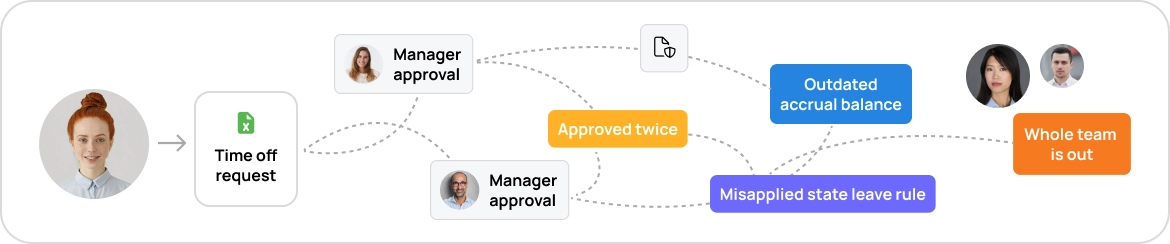
Running time off from a shared spreadsheet and a string of emails works, until it doesn't.
- The request was approved twice, because two managers both said yes.
- The accrual balance nobody's updated since last quarter.
- The state leave rule you didn't know applied, until it became a problem.
- The whole team out the same week, and no one caught it.
It adds up.
With TalentHR
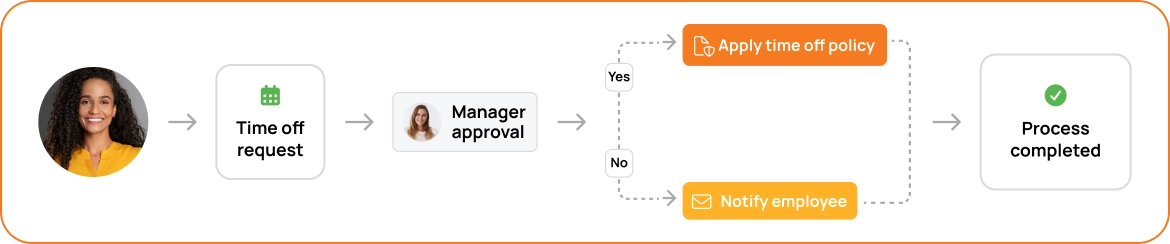
Someone requests time off, and TalentHR applies the policy you set and keeps everything in sync, automatically.
- The right policy applies based on the employee's role and location.
- Accruals and balances update on their own — no spreadsheet.
- Approvals route to the right manager, who can see who's already out.
- Every request is recorded, so your history is always clean.
All, automatically.
From request to record, handled in one place
TalentHR turns time-off tracking into one self-running workflow, accurate down to the hour.
Set your policies once
Configure time-off and leave policies by role, team, location, or down to individual employees. Set them up once, and forget all about manual sorting.
Balances that update themselves
No more spreadsheets, for real. Balances move as people earn and take time, so everyone's looking at the same accurate number.
Approvals that route themselves
Requests go to the line manager automatically (and any additional approvers you set), with a clear view of who's already out that week. No more back-and-forth emails.
A clean record for everything
Every request, approval, and balance change is logged and easy to find. When you need the full picture for an audit or a dispute, it's right there.
Made for multi-location teams
Set up location-specific policies, and the right one applies to each employee. A growing, distributed team stays organized as the rules differ state to state.
Your team helps themselves
Employees check their own balances and request time off directly (via the web, our mobile app, email, or Slack) and managers respond the same way.
TalentHR is an HR software and does not provide legal advice. Employers remain responsible for their own compliance obligations.
Honest feedback from teams who switched to TalentHR
Less chasing. Cleaner records.
It's been very easy to use and implement, and it fits our needs without paying hundreds for other tools that do the exact same thing with maybe a few more bells and whistles.
Cosmas U.
CEO
Oil & Energy
TalentHR is an excellent tool for an HR Manager; you can go from your 1000 Excel sheets to this HRMS and have all the information you need together.
Nikolleta B.
Human Resources Manager
Program Development
It has been a great tool in my school, my teachers know exactly where to go when they need help, and the way to manage PTO is fantastic!
Alejandro P.
Principal
Education Management
