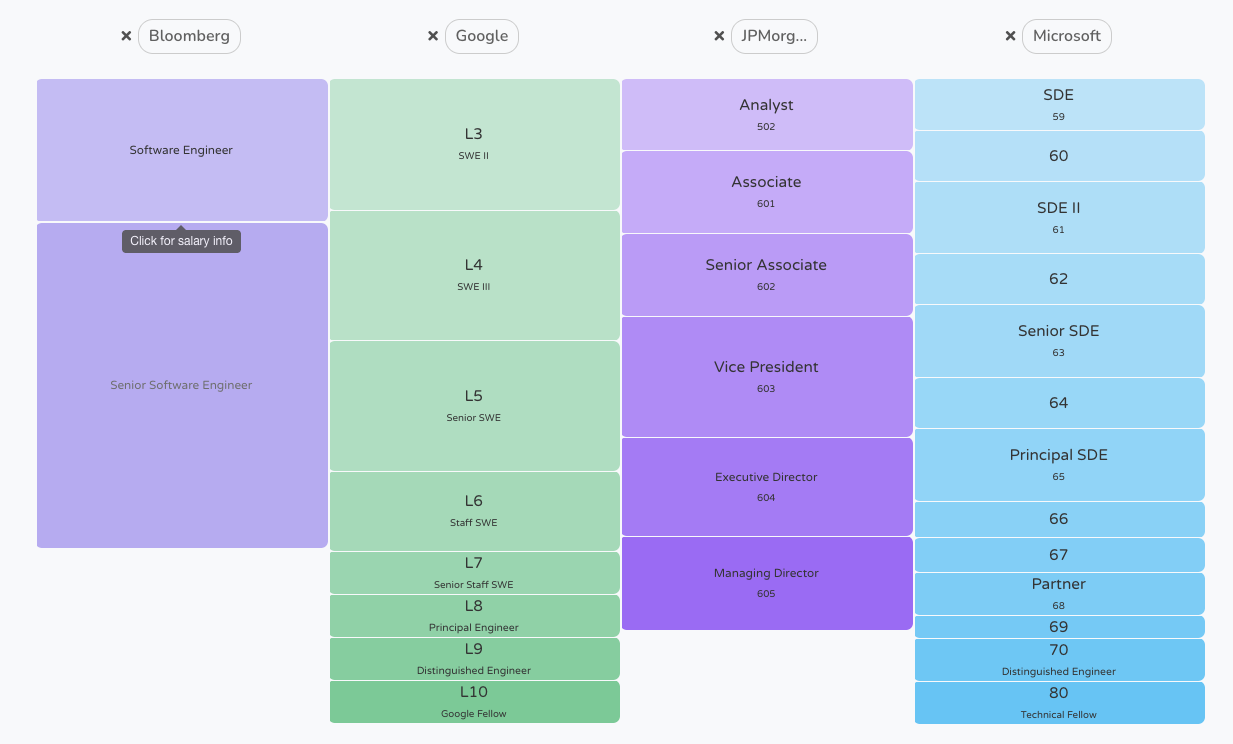
In many companies, there isn’t a consistent method for mapping job titles to seniority levels. This often becomes evident in the organizational chart. The employee list for a certain department can include a Customer Success Specialist, a Client Success Lead, and a CSM (Customer Success Manager or, maybe, Chief Success Manager?)
For a new hire (or an external auditor), it’s difficult to tell which of these employees is the most senior.
The problems with having unclear seniority titles
These overlapping job titles can create two problems: Clients may not know whom to contact when an issue arises, and HR teams may struggle to determine which salary band applies to each role. This means that during a position transfer, such as a promotion, an employee might assume they’re moving to a new salary band and getting a pay raise. If they’re simply moving horizontally, without a salary increase, they might be disappointed.
Of course, HR has been working at the company long enough to know the differences between each role, and titles (as well as who performs them) can give them clues about who’s who. But these tacit understandings are not universal rules that even a newcomer can follow.
This article covers a practical way to map inconsistent or overlapping titles to standardized levels (that can work within salary bands), without forcing employees to use identical titles or requiring employees to explain a new naming system to clients.
The main principle that guides this article reads like this:
Title → Career Track → Level
Why HR can’t map seniority from the title alone
HR can’t map seniority from the title alone because companies have developed different naming conventions for similar roles.
The classic example is the Account Manager. An Account Manager is typically a sales or customer-facing role in which an employee takes care of (manages) accounts. Accounts are another word for clients. So often, the Account Manager doesn't have anyone reporting to them, even if their title says "Manager" in big bold letters. What they're managing is the client base. In other companies, the Business Development Manager performs the same role without people under their supervision. These titles can be misleading, since AMs and BDMs are usually individual contributors (ICs).
Engineering Managers, on the other hand, often manage people rather than focusing on engineering work themselves. They're tasked with supervising employees who prepare pull requests or plan technical projects. Here, “manager” means something different.
Then there’s Head of Marketing, Head of Customer Success, or Chief Success Officer. These titles can mean very different things in a 20-person company compared to a 200-person company. Of course, a Chief Success Officer title looks impressive to customers, but from the inside, the responsibilities of each role might be wholly different between two companies.
So, for HR folks who want to fix this conundrum of how to map job titles to seniority levels, you should start by distinguishing the job title, which is what the role is called, versus the seniority level. Seniority depends on the role's autonomy, responsibilities, scope, and impact.
You don’t necessarily want to make every title identical. You do need to be able to have comparable levels in organizational charts so that you can allow someone to project their growth vertically and to be able to check against a colleague horizontally.
Why this matters more now
What we’re describing here is usually called job architecture or job leveling. Big organizations often do it with formal job evaluation methods, like Mercer’s International Position Evaluation or the Korn Ferry Hay method, which score roles on factors such as knowledge, problem-solving, and accountability. You don’t need anything that heavy to get started, but the logic is the same: you’re judging the job, not the title.
If you employ people in the EU, there’s also a legal reason to get this right. The EU Pay Transparency Directive (2023/970) requires employers to have pay structures that allow them to compare jobs of equal value using objective, gender-neutral criteria, and to explain how employees progress in pay. Member states had until June 2026 to bring it into national law, so check where your country stands. Either way, it’s very hard to meet those requirements if two people doing the same level of work hold titles nobody can compare.
Define the levels you’re mapping into
As we said before, you don't need to follow a universal framework, but you do need to have one that's consistent within your company. Below is an example you can use as a starting point and adapt to your organization's needs.
You can start with five levels. For example:
- Level 1: Entry or Junior
- Level 2: Mid-level
- Level 3: Senior
- Level 4: Lead or Principal
- Level 5: Leadership
This is a simplified example, and it varies by company and industry. Larger companies may need additional levels to distinguish between senior individual contributors, directors, VPs, and executives.
Career tracks should be separated from seniority because you can have an individual contributor, a people manager, or an executive. So, for example, a Staff Engineer and an Engineering Manager can still have a comparable seniority even if they have a different career track because one of them, the Engineering Manager, manages other employees.
How to map job titles to seniority levels
Here’s how HR can map job titles to seniority levels so that the company can have a predictable, comparable job map.
Step 1: Keep the original job title
If employees already use certain titles on their business cards or email signatures, leave them as they are. You don't need to overwrite them. Just keep the original title alongside standardized internal fields, including the role, seniority level, and career track. HR software that keeps a record for each employee makes this much easier to track.
Step 2: Separate the role from the seniority signal
In your internal classification, look for keywords that suggest seniority, like junior, senior, intermediate, or VP, and others that describe the role or department. For example, junior web developer.
There might still be a legacy in your company of using director and VP almost as synonyms, so just make sure that you treat these keywords as suggestions.
Step 3: Identify the career track
The career track helps distinguish between employees who manage their own work and those who actually manage people. So you can start by separating employees into three broad categories:
- an individual contributor (a Business Development Manager),
- a people manager (a Support Team Leader), or
- an executive (a Chief Human Resources Officer).
Naturally, if you know the company, you’ll be able to infer if a "manager in name only", like an AM, actually oversees other employees or is an IC. But for an outsider or a newcomer, this is somewhat more difficult, so don’t let expressions like manager do the heavy lifting.
You should instead be checking the job description, what they’re doing, and the reporting relationships to understand which career track each person belongs to.
Step 4: Check the actual scope of the role
You can use five criteria, although two or three might be enough for a smaller company to build a useful classification.
- Autonomy, which is how independently they can work.
- Complexity, meaning how difficult their problems are and how much judgment the work takes.
- Scope, whether they're responsible for individual tasks, projects, teams, or entire departments.
- Impact, if their decisions affect only themselves, they affect the whole team, a whole department, or the whole company.
- Responsibility, which covers the outcomes, projects, or people they're accountable for.
Step 5: Assign the level and flag unclear cases
If you've completed steps 1 to 4, you should now have an initial map. You can start with two different departments and compare the results. You might realize that your Account Manager and Customer Success Specialist belong to the same seniority level, even though their titles are different.
But you might still have some unclear cases, such as whether the VP of Engineering has the same seniority level as the Chief Success Officer. In that case, you can make a provisional mapping based on the employee's responsibilities, then use a confidence field like high, medium, or needs review. Any uncertain cases should be reviewed with the relevant managers before finalizing the level.
Step 6: Connect levels to salary bands
The intro to this article started with a pay problem, so this is where the mapping pays off. Once every role has a level, each level can have a salary band. Two people at Level 3 in different departments won’t necessarily earn the same, since market rates for engineers and support staff differ, but each department’s Level 3 band should sit above its Level 2 band.
This also fixes the promotion problem we mentioned at the start. When someone moves from Level 2 to Level 3, everyone knows it's a step up, and the salary implications are easier to discuss. When someone moves sideways into a role at the same level, that's clear too, helping avoid misunderstandings about pay.
A quick example
Let’s go back to the customer success team from the start of this article.
Two of the three end up at the same level, even though one title says “Manager.” The third needs a conversation with their manager before it’s finalized. Those columns (original title, track, level, confidence, and a short reason) are a good template for your own mapping spreadsheet.
Mapping job-title-to-seniority cheat sheet
This quick reference table can help HR teams make an initial assessment. The suggested levels are starting points, not fixed rules, so always check the actual responsibilities of each role.
The titles most likely to cause mapping mistakes
This is a list of the typical titles that may cause a mapping mistake and that might confuse someone who is seeing the organizational chart for the first time.
- Manager, the classic example. Manager might describe someone who is an IC and who is taking care of a certain vertical, like the clients, the account, or a product, the Product Manager. But in other cases, the word directly implies you’re a people manager.
- Lead. It might not necessarily mean that they are leading people in the project or that they have people reporting to them.
- Head of is usually a senior role. For example, Head of Engineering, but the context of what they do is really dependent on the company.
- Chief, as in Chief Executive Officer, Chief Marketing Officer, and such. A Chief of Staff, for example, is usually a trusted advisor to the CEO rather than the head of a department. The title says “Chief,” but the scope can look nothing like a CMO’s or a CFO’s.
- Associate. Depending on the industry, it can mean extremely diverse pay grades and roles. In law firms, an Associate is a very hierarchical position, but in a brick-and-mortar store, a Sales Associate is often an entry-level role on the shop floor.
- Staff and Principal might be a bit confusing. They're often very advanced positions in engineering, like Staff Engineer, and they're usually individual contributors. However, they may also mentor other employees or lead important technical projects. These titles don't necessarily mean they're managing people, so it's important to check their actual responsibilities.
- VP. In some companies, a VP ranks above a director, while in others the two titles may represent similar levels of responsibility. It depends on the company's structure.
Map your titles to seniority levels with HR software
When you map job titles to seniority levels, you're creating a consistent system underneath the titles employees already use on their business cards or email signatures. You're also making it easier for employees to understand their career path, which may help them see opportunities to grow within the company.
In short, preserve the original title, identify the role and career track, assess the scope, and assign a standardized level. If a case is ambiguous, flag it for review.
As a company grows, keeping employee records, job titles, departments, organizational charts, and reporting relationships in one HR system can make its structure easier to maintain and understand.